- Home
- Technology
- Hard drives and SSDs
Hard drives and SSDs
How a computer remembers your files for years with the power off.
The short version
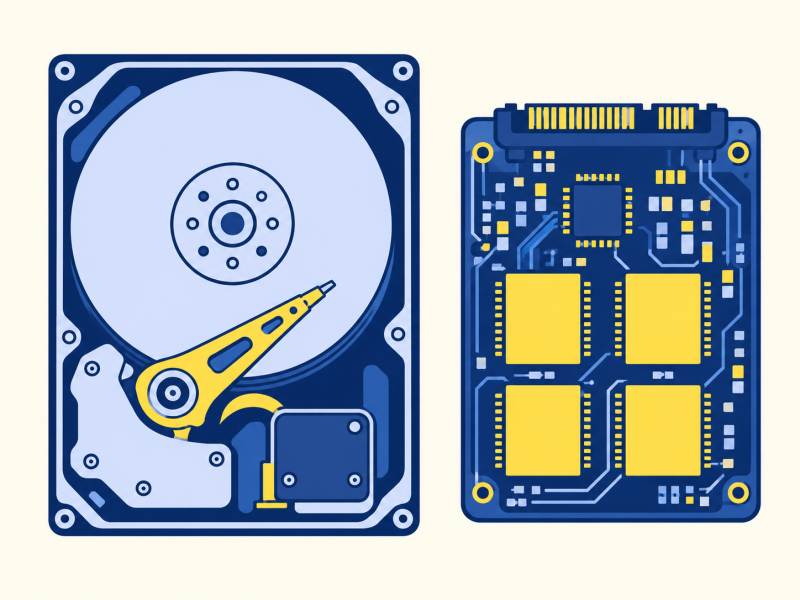
A hard drive stores data as tiny magnetic patterns on spinning metal discs. An SSD stores it in chips that trap electric charge, with nothing moving. SSDs are quicker and tougher, while hard drives are cheaper for large amounts of storage. It builds on memory and storage.
I always thought deleting a file made it vanish.
It only removes the label.
On a hard drive, the file’s data may remain until the space is overwritten. On an SSD, the drive may erase deleted blocks after the operating system sends a TRIM command, so recovery is less predictable.
Two ways of remembering
Hard drive
Magnetic patterns on discs that spin thousands of times a minute. Cheap for a lot of storage.
SSD
The memory chipCharge trapped in flash memory cells with nothing moving. Faster, silent and tougher.
Inside a hard drive
A hard drive has one or more metal discs coated in a magnetic layer. They spin at 5,400 or 7,200 revolutions a minute. A tiny arm swings a read-and-write head over the surface, floating a few billionths of a metre above it on a cushion of air. To write, the head magnetises a very small spot one way or the other, which stands for 1 or 0. To read, it senses which way each spot points.
Because the arm must move to the right place, and the disc must turn to bring the data round, a hard drive takes a few thousandths of a second to find anything. That is fast to a person and slow to a processor.
Inside an SSD
An SSD has no moving parts. It has chips divided into cells that can trap a tiny amount of electric charge. A cell with the charge counts as one value, and without it, as another. The charge stays trapped with the power off, which is why a USB stick remembers.
Finding data is nearly instant, since there is no arm to move. Cells wear out after very many rewrites, but in everyday use a modern SSD lasts for years.
Deleting a file erases it.
Deleting removes a file’s directory entry; it does not securely wipe a drive. On a hard drive, data may remain until overwritten. SSD TRIM and cleanup may erase blocks earlier, so recovery is uncertain. Use the maker’s secure erase or reset guidance before resale.
Why a drive shows less than it says
A drive sold as 1 terabyte holds one trillion bytes, because makers count in thousands. Computers often count in a slightly different way, based on powers of two, and report about 931 gigabytes. Nothing is missing: the two sides are counting with different units. Some space is also used by the operating system and by the drive itself.
USB sticks and memory cards use the same flash chips as an SSD, in a smaller package. Most laptops now have an SSD, while hard drives remain common for large, cheap storage such as backups and video archives.
Key takeaways
- Hard drives store data magnetically on spinning discs.
- SSDs store it as charge in chips.
- SSDs are faster, quieter and tougher.
- Hard drives cost less per gigabyte.
- Deleting a file removes its directory entry; whether the data can be recovered depends on the drive and what happens next.
Now you know.
Hard drives are magnetic.
SSDs are chips.
Delete only removes the label.
Last reviewed 3 Nov 2026
Where next?
More in Technology
-
Read
 Technology
Artificial intelligence
What AI means today: software that learns patterns from examples instead of following written rules, and…
-
Read
 Technology
Fingerprint and face unlock
How fingerprint and face unlock work: a scan becomes a pattern of numbers kept on the phone and compared each…
-
Read
 Technology
Bluetooth
How Bluetooth uses short-range radio to connect headphones, keyboards and speakers, why pairing is needed…