- Home
- Technology
- The internet
- How a page reaches you
How a web page reaches you
Follow a web page from a faraway computer to your screen, one small packet at a time.
The short version
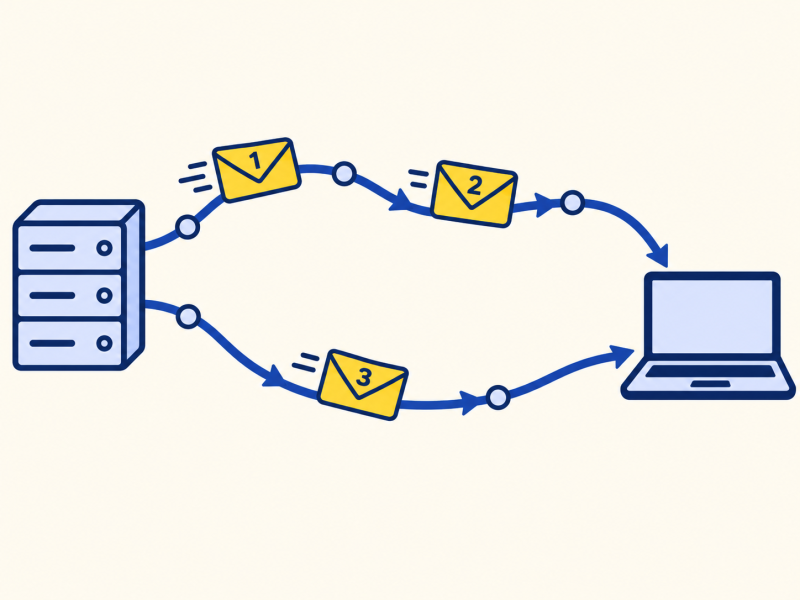
A web page is cut into packets, each labelled with an address. Routers pass them along, hop by hop, and they may take different routes. Your device puts them back in order, and asks again for any that went missing. It builds on the internet.
I always imagined a page travelling whole, like a letter.
It is more like a jigsaw sent through the post a piece at a time.
It only becomes a page at the end.
Step by step
- Your browser looks up the site's address using DNS.
- It asks that server for the page.
- The server cuts the page into many packets and numbers them.
- Each packet goes to a router, which reads the address and passes it on to the next router closer to you.
- Your device receives them, puts them in order, and asks again for any that are missing.
- The browser draws the page.
About 15 hops
A typical page request passes through ten to twenty routers on its way. You can see yours with the `tracert` command on Windows.
Why packets
Sending small pieces means one busy cable does not block everything: the packets can go another way. Many people can share the same cables, each taking a turn. And if something breaks, only the lost pieces need sending again.
The time a packet takes to go there and back is called latency, or ping. It depends mostly on distance, since signals cannot travel faster than light.
Key takeaways
- Pages are cut into numbered packets.
- Routers pass packets on, hop by hop.
- Packets can take different routes.
- Missing packets are asked for again.
Now you know.
A page travels as packets, not whole.
Routers pass them on.
Your device puts the jigsaw back together.
Last reviewed 3 Nov 2026
Where next?
Builds on

More in The internet
-
Read
 Technology
How DNS finds a website
How DNS turns a website name into an IP address, the chain of look-ups it uses, why it is fast, and why a DNS…
-
Read
 Technology
Fibre broadband
How fibre broadband sends light through glass to deliver fast internet, and the difference between full fibre…
-
Read
 Technology
What an IP address is
What an IP address is, how it works like a postal address for data, why your home has one shared by all your…